
Syncing music with light displays can transform your setup into an unforgettable show. The right music sets the tone, enhances visuals, and creates a deeper connection with your audience. Here’s a quick guide to get started:
How to Pick Music for a Light Display: Step-by-Step Guide
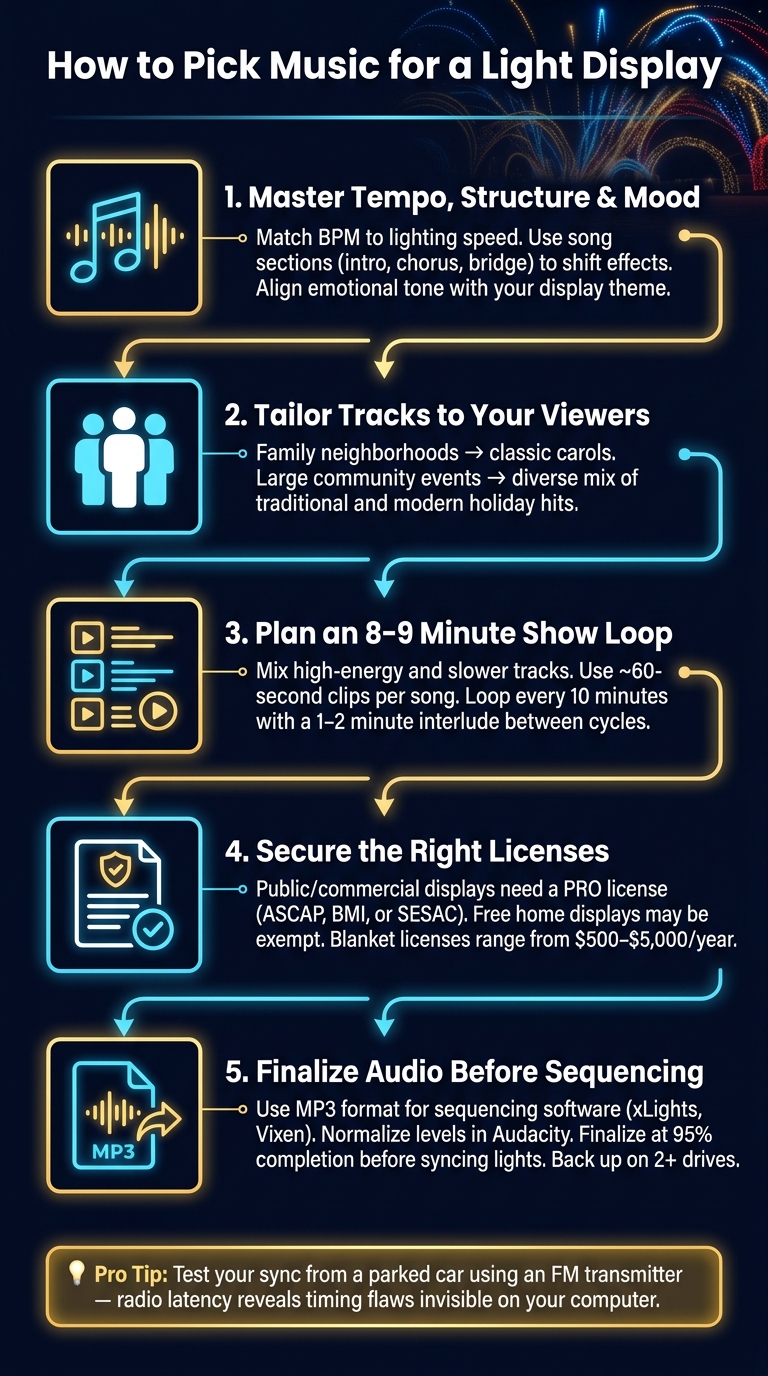
Before diving into song selection, it’s important to grasp what makes a track work for a light display. Three key elements – tempo, song structure, and mood – are the backbone of a polished show. Nail these, and your light display will feel intentional and engaging, rather than chaotic or random.
Tempo, measured in beats per minute (BPM), determines the speed of your lighting effects. Faster songs naturally pair with rapid transitions like strobes, chasers, or quick on/off pulses. On the other hand, slower tracks shine with smooth fades and gentle color transitions.
Your lighting sync operates on two layers:
Timing is everything. Even minor delays during drum hits, vocal cues, or sharp blackouts can stand out.
"Tiny timing issues are more noticeable than most beginners expect, especially on drum hits, vocal cues, and sharp blackouts." – User Guides Tips Insights
Here’s a practical tip: test your sync by watching your display from a parked car using an FM transmitter. Radio latency can reveal timing flaws that might seem fine on your computer but become glaringly obvious when viewed from the street.
Once you’ve nailed the rhythm, it’s time to think about how the song’s structure and dynamics shape the overall experience.
Every track has a structure – intro, verse, chorus, bridge, outro – and each section offers a chance to shift your lighting effects. For example, choruses are perfect for high-energy, bright visuals, while verses might benefit from softer, subtler transitions. Structuring your display around the song’s flow helps create a seamless and engaging experience.
Dynamics, or the contrast between quiet and loud moments, also play a huge role. A common rookie mistake is cramming every second with motion.
"The biggest beginner mistake is filling every moment with motion. Leave room for contrast. If everything flashes all the time, nothing feels special. Let the music breathe." – Userxtop
Strategic pauses – like blackouts or subtle fades during quieter parts – make the energetic moments stand out even more. By keeping each segment tight and purposeful, you’ll hold the audience’s attention.
The mood of your song should match the message or vibe of your display. A cheerful, family-friendly setup will call for different music than a dramatic, large-scale production.
"Visual elements set the scene, but music drives the emotional impact." – Audioblanket
When the mood of the music aligns with your lighting design, the display feels cohesive and immersive. On the flip side, mismatched elements can feel jarring to viewers. For example, using LED spotlights to shift colors along with a song’s emotional highs and lows can strengthen the connection between the visuals and the music. As Tesla’s Light House team puts it: "It’s not about having the most lights – it’s about creating an emotional connection with your audience."
Understanding tempo, structure, and mood is one thing. But the real challenge is making sure the songs you pick align perfectly with your display’s purpose and the audience you’re trying to reach.
Start by nailing down your display’s theme. A "Winter Wonderland" setup calls for a completely different vibe than a movie-inspired or high-energy community event. Your theme dictates everything – music, color schemes, and light effects.
Instead of playing full-length tracks, aim for shorter, story-driven segments. For example, Broomfield Lights transformed their show into an 8–9 minute loop of roughly 60-second clips, replaying every 10 minutes.
"1 minute or so is about the limit for a single song when making a compilation. Much more than that and most songs tend to get repetitive and the viewer can lose interest." – Broomfield Lights
Once you’ve set your theme, think about your audience. Their preferences will help fine-tune your playlist.
Who’s watching your display? Matching your music to your audience can enhance the experience and reinforce your theme. For example, a neighborhood display typically attracts families with young kids, so classic carols and familiar holiday tunes are usually a hit. On the other hand, a large community drive-through might need a more diverse mix – traditional songs for older visitors and modern holiday hits for younger ones.
Keep things dynamic by mixing genres. A varied playlist helps maintain energy, but every track should still feel like it belongs. Piercelights, for instance, synchronized their display’s color changes with bilingual lyrics, creating smooth transitions that felt natural.
Once your playlist is set, make sure the technical details are in place to deliver a polished experience.
Outdoor playback has its own challenges. A song that sounds great in headphones might not hold up when broadcast over an FM transmitter to cars parked on the street. Always test your tracks the way your audience will hear them – through a car stereo and from a distance.
Lyrics matter, too. For family-friendly displays, clean and inviting songs are a must. Even subtle references in a track can derail the mood you’re working to create. Stick to instrumentals or well-known holiday vocals, and take the extra step to ensure volume consistency. Tools like Audacity can help you normalize audio levels, so no single track overpowers the rest.
Just like timing each lighting cue perfectly, your playlist needs to flow smoothly from one moment to the next. With a solid collection of songs, focus on creating a show that feels intentional, not just a random shuffle of tracks.
A great light show takes the audience on an emotional journey, blending high-energy tracks with slower, more melodic ones. This contrast creates a dynamic experience.
"The beauty of music is often in the comparison between the highs and the lows and a show should take its listeners through that full spectrum." – Broomfield Lights
Think of your playlist as a story arc: start with something attention-grabbing, let it settle into a quieter middle section, and then build toward a powerful finale. Combining well-loved classics like "Carol of the Bells" with playful modern hits like "Mr. Grinch" keeps the energy varied and appeals to a wide audience. Aim for a total runtime of 8–9 minutes – long enough to feel complete but short enough to hold attention.
Once you’ve planned the energy flow, make sure all your tracks are at consistent audio levels for a polished experience.
Few things ruin the mood faster than a sudden volume spike between songs. Before finalizing your playlist, use a tool like Audacity (a free and open-source program) to adjust each track’s volume. Apply the Amplify or Normalize effect to ensure all songs have a consistent gain level.
After balancing the audio, combine all your tracks into a single MP3 file. This eliminates gaps and volume inconsistencies caused by playback software. Plus, it gives you full control over transitions. Be sure to finalize your audio at 95% before sequencing your light show. Adjusting song lengths after sequencing can throw off all your carefully timed lighting effects.
Once you’ve got a balanced and unified playlist, plan your show’s loop to keep visitors engaged. The length of your loop directly impacts how people experience your display. For example, Broomfield Lights learned this the hard way in 2016 with a 10.5-minute show and a 4.5-minute interlude – too much downtime. By 2017, they refined it to an 8–9 minute show every 10 minutes, ensuring visitors stayed engaged even if they arrived mid-cycle.
Use the short gap between loops wisely. A 1–2 minute interlude can feature a recorded voice-over thanking visitors, sharing your website, or reminding guests to avoid blocking driveways – all without disrupting the atmosphere. And don’t forget about local noise ordinances. Many residential areas enforce quiet hours starting at 10:00 p.m., so plan your loop schedule accordingly to maintain good relationships with your neighbors.
When planning a public light display, it’s not just about picking the perfect songs or creating a flawless sequence. You also need to tackle the legal and technical aspects to ensure everything runs smoothly.
Playing music publicly is a completely different ballgame from listening to it at home. According to U.S. copyright law, using music in a public setting requires a license. Each song has two separate copyrights: one for the composition (melody and lyrics) and another for the sound recording. To stay compliant, most organizers of public displays secure a performance license through a Performing Rights Organization (PRO) like ASCAP, BMI, or SESAC.
However, there’s a key exception: if you’re putting on a free, non-commercial display at home, you may not need a license.
"A FREE Christmas display put on by a family at their home does not need an ASCAP license." – Jeff Holmes, Co-owner, Lights, Music, Magic!
For displays at commercial venues, fundraising events, or those charging admission, obtaining a blanket license from major PROs is the safest option. These licenses typically range from $500 to over $5,000 annually. Keep in mind, personal streaming accounts like Spotify or Apple Music are strictly for private use and cannot legally be used for public playback.
If you plan to film your display for online sharing, you’ll need additional licenses: a synchronization license for the song’s composition and a master use license for the recording. Ignoring this step can lead to takedowns. For example, YouTube processed over 2.2 billion Content ID claims in 2024 alone.
Once you’ve sorted out licensing, it’s time to prepare your audio files for sequencing. For most sequencing software, like xLights or Vixen, MP3 is the go-to format. It balances compatibility, manageable file size, and reliable playback. If you need higher quality for editing, WAV files are a great option before converting to MP3 for the final export.
One crucial tip: finalize your audio file before starting your sequencing. As Broomfield Lights explains:
"The end result of our work in Audacity is an export of the compiled music to a single MP3 file that we can then import into Vixen for doing the sequencing."
Even minor changes to the audio file after sequencing – like trimming – can throw your lighting effects out of sync. Aim to have your audio file at 95% completion before diving into sequencing.
Backing up your audio files is just as important as perfecting your edits. Always save copies of your files on at least two separate drives. Losing or corrupting a file mid-season could force you to use a replacement with slight timing differences, which can disrupt your sequence. The same rule applies to your licensing: keep both digital and physical copies of your PRO licenses, receipts for royalty-free music, and any agreements with music providers.
Creating the perfect soundtrack for your light display is a mix of technical know-how and artistic flair. You’ll want to think about tempo, rhythm, and how the structure of each song aligns with your lighting effects. A well-thought-out playlist should guide your audience through a dynamic journey, balancing slower, quieter moments with bursts of high energy.
Don’t overlook the practicalities. Finalizing your audio early, ensuring consistent volume levels across tracks, and keeping backups on separate drives are essential steps to avoid last-minute hiccups. If your display is open to the public, make sure you’ve sorted out licensing with organizations like ASCAP, BMI, or SESAC before your big debut.
When you combine a solid technical setup with carefully chosen music, your display can resonate on both a visual and emotional level. For added inspiration, check out what other creators are doing. The Christmas Light Guide is a great resource for exploring verified displays across the country, from cozy home setups to massive non-profit productions. You can also list your own synchronized show on the guide to share it with your community and help visitors discover your work.
As Tesla’s Light House Team beautifully puts it:
"It’s not about having the most lights – it’s about creating an emotional connection with your audience." – Tesla’s Light House Team
Start with a clear plan, lock in your audio, and let the music guide your vision. That’s the secret to a truly unforgettable display.
To figure out a song’s BPM quickly, you can use an online BPM detector. Just upload the audio file or paste the song’s URL, and the tool will calculate the tempo in seconds. Prefer a hands-on approach? Play the song and use a tap tempo tool – tap along with the beat for 8–12 measures to get the BPM. If the result feels incorrect, keep in mind that some music genres might count the tempo at double or half the detected value.
If your lights seem out of sync with a radio broadcast, start by confirming that the show is aligned with the exact audio version and its timing marks. Make sure you’re using the same system to handle both the audio playback and the lighting controls. Double-check for any audio delays, ensure all channel and controller mappings are correct, and adjust the timing in your sequencer to match the beat. Once you’ve made these tweaks, re-test the entire show to verify synchronization.
Whether or not you need a music license depends on how you’re using the music in your display. If it’s a non-commercial home display – meaning you’re not charging admission or collecting money – you typically won’t need a public performance license. On the other hand, commercial displays, such as those connected to businesses or accepting donations, will require proper licensing from organizations like ASCAP, BMI, or SESAC. It’s always a good idea to check directly with these groups to make sure you’re following the rules.